3 Ways to Create Your website
A Guide to Deciding Between DIY & Hiring a Website Designer
You’ve reached the point where you know you need a website. You’ve scoped out the platforms, you’ve got your branding ideas swirling, and you’re ready to make it official. Now comes the ultimate crossroads: Should you spend your weekends DIY-ing a template, or is it time to hire a professional to handle the heavy lifting?
As a small business owner, freelancer or blogger, your budget and your time are your two most valuable resources. Choosing between a DIY approach and a custom design isn't just about the price tag—it’s about your season of business and your long-term goals.
Here is a transparent breakdown to help you decide which path leads to your dream website.
The DIY Approach
If you are in the very start of your business—(i.e. if you’re still refining your services and watching every dollar) DIY is most likely the best move.
The Pros: It’s budget-friendly, and you’ll learn the "back end" of your website, making it easy to change a photo or a sentence later.
The Cons: What looks like a "quick weekend project" can easily turn into three weeks of frustration as you struggle to make a text box align correctly or get your mobile view to stop looking like a weirdo.
The DIY Approach is Best For: For those who have more time than capital and need to get something online quick-ish.
The DIY Approach with Template Customization
Many designers (myself included!) offer premium templates or "template restyles." This is where you buy a professionally designed layout and then customize the colors, fonts, and images to fit your brand.
The Pros: You get the "designer look" without the custom price tag. The strategy is already built into the layout, so you don't have to guess where the "Book Now" button should go.
I enjoy Big Cat Creative’s Squarespace Website Templates. If you are interested in looking at the templates, you can check them out here.
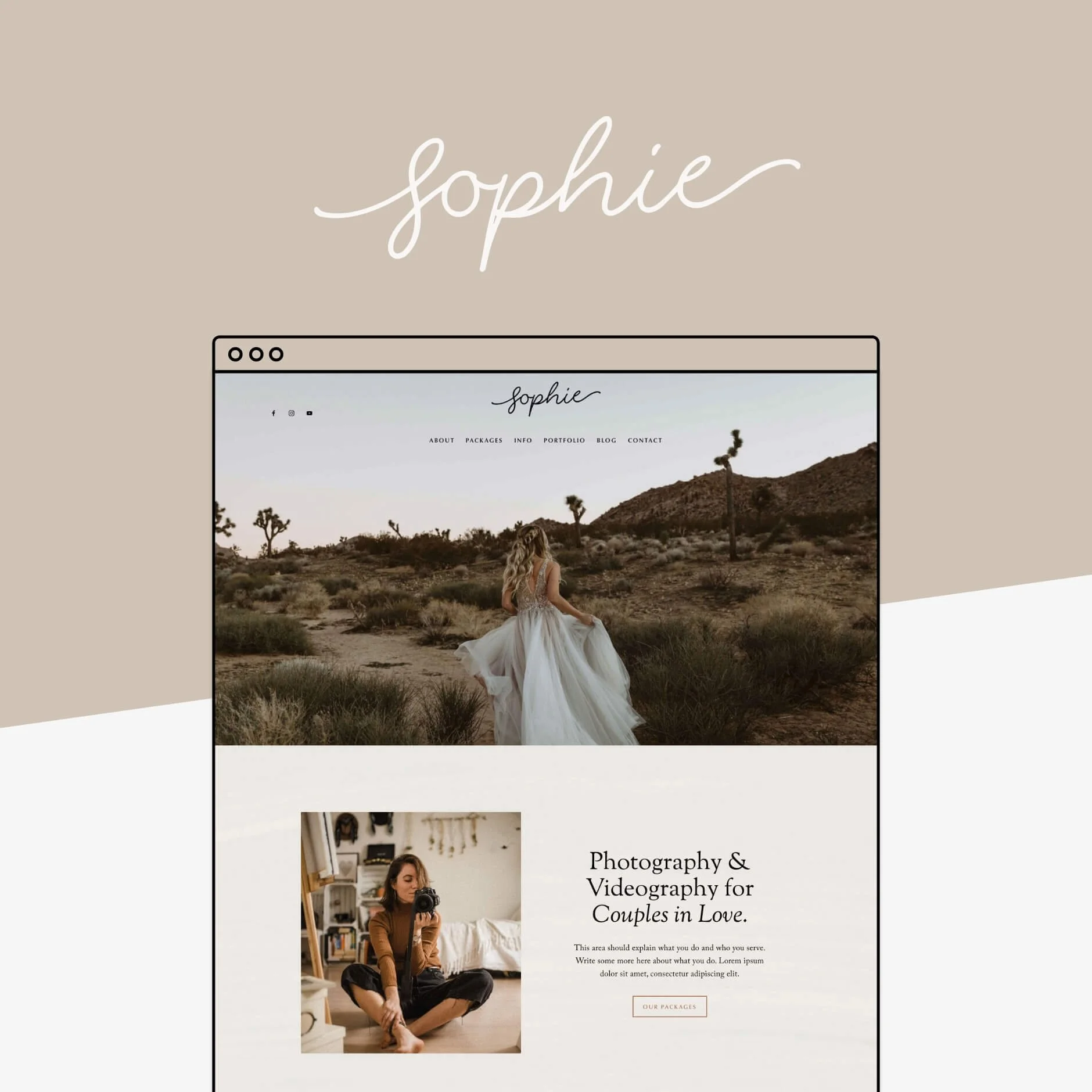
Big Cat Creative’s Sophie Squarespace Website Template
The Cons: You still have to put in the manual labor of inputting your content (images, copy, colors, etc.), which can be time-consuming if you aren't tech-savvy.
Hiring a Website Designer
This is for the business owner who is ready to scale. You’ve moved past the "just starting out" phase and you’re ready for a site that acts as your personal sales professional.
The Pros: A designer doesn’t just make things pretty; we build a workflow. We handle the SEO, the mobile optimization, and the tech integrations (like your email list and booking calendar) so that you don't have to. With a website designer, you get your time back to focus on your business.
The Cons: A higher upfront investment.
The Hiring a Website Designer Approach is Best For: Established business owners who are busy in the work and need their website to automate their processes to continue bringing in clients & sales.
3 Questions to Ask Yourself Before You Decide
What is my hourly rate? If it takes you 40 hours to build a website - Is that "free," or did it actually cost you thousands of dollars in lost client work & sales?
Does my current DIY site make me feel "Website Shame"? If you’re hesitant to send people your website link, it’s actively hurting your growth.
Am I a "Tech-Lover" or a "Tech-Hater"? If looking at a dashboard makes you want to go for a long walk in the woods, delegating is an act of self-care.
Just so you know, there is no wrong answer.
There is only the answer that fits your current season. If you have the budget, delegating allows you to launch with a professional from day one. If you’re building from the ground up, a DIY template is a fantastic steppingstone.
The goal isn't just to have a website—it’s to have a tool that works as hard as you do.
Website Design Resources to Check Out
Branding Toolkit: 25 color palettes with font pairings and logo suggestions. Choose & launch.
Squarespace Playbook: 44-page digital download with steps to launch your Squarespace Website.
Big Cat Creative’s Squarespace Website Templates: Customize a template to launch faster!
Pinterest Wealth Academy: Learn how to market your business through Pinterest, rather than always feeling “On” through Social Media.
From My Home to Yours
You can always keep up with the products I’m bringing into our home. I have an Amazon Storefront of all the things by category, to keep my favorite items organized for you. Feel free to browse around, and see if there is anything you might find useful in your own home. I do make a small commission from purchases at no cost to you (affiliate disclaimer).
Sign up for my Newsletter
The blogs I share will be related to website design, business, motherhood, lifestyle & blogging!